The search for Affordable Laptop Service ends here.
Finding an inexpensive notebook was easier than locating reasonably priced laptop repairs.
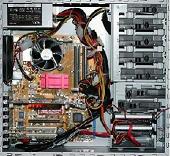 There is a reason for this. Desktop computers have evolved an ongoing set of standard type parts from the 3.5″ hard drives and 5.25″ CDDVD drives to the memory, cpu, various expansion cards, and atx power supplies which can all be accessed by removing the side cover. This is usually done by taking out one or two screws. You can see from this illustration that the various components are readily accessible when the side panel has been removed. Many desktop systems like this, even from different manufacturers can be upgraded with the same array of interchangeable parts and are therefore widely supported by computer and office supply stores. There is a reason for this. Desktop computers have evolved an ongoing set of standard type parts from the 3.5″ hard drives and 5.25″ CDDVD drives to the memory, cpu, various expansion cards, and atx power supplies which can all be accessed by removing the side cover. This is usually done by taking out one or two screws. You can see from this illustration that the various components are readily accessible when the side panel has been removed. Many desktop systems like this, even from different manufacturers can be upgraded with the same array of interchangeable parts and are therefore widely supported by computer and office supply stores.
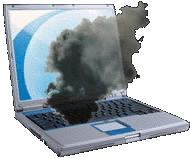 Laptops, netbooks, notebooks, and tablet PCs, however, are a different story. Although there is some standardization in certain types of parts (drive connections, for example), each model is like a different Chinese puzzle in the way they are assembled. Consequently, there is an array of problems peculiar to laptops not experienced on desktop systems. Also made with laptop parts, all-in-one computers and mini desktop systems (the size of a dictionary and smaller) can experience similar problems. Commonly seen, the LCD screen can have loose hinges, lines in the display, or it may wink out. Another frequently reported problem is a loose or broken DC power jack. A battery fire (pictured here) can turn your laptop into an ugly mess, but we may still be able to recover your personal files from the hard drive. Laptops, netbooks, notebooks, and tablet PCs, however, are a different story. Although there is some standardization in certain types of parts (drive connections, for example), each model is like a different Chinese puzzle in the way they are assembled. Consequently, there is an array of problems peculiar to laptops not experienced on desktop systems. Also made with laptop parts, all-in-one computers and mini desktop systems (the size of a dictionary and smaller) can experience similar problems. Commonly seen, the LCD screen can have loose hinges, lines in the display, or it may wink out. Another frequently reported problem is a loose or broken DC power jack. A battery fire (pictured here) can turn your laptop into an ugly mess, but we may still be able to recover your personal files from the hard drive.
Most laptops are delicate and not as easily accessed as desktop systems for most components, so it is easier for the service buck to be passed back to the manufacturer. The laptops built by Acer, Compaq, Dell, eMachines, Gateway, Hp, IBM/Lenovo, Sony, & Toshiba are well supported with extendable warrantees, but when these warrantees run out, their prices for parts and service can be prohibitive. If you don’t see your brand listed here, don’t worry, yours is also supported in all versions of Windows and in all languages.
|